Vitre - Handing the Page to an Agent (Part 3)
Two years ago, in the post that started this, I doubted language models would learn to plan for themselves "in a reasonable time frame." I was wrong about the timing. Vitre now lets an agent control a page using the same underlying implementation as a workflow.
Part one covered the steps, and part two covered how callers share the WebView thread. This post explains how an agent sees the page and uses those steps.
Showing the agent what it can click
A developer writing a workflow can inspect the page and choose selectors such as #buy, .titleline > a, or //div[@data-component-type='s-search-result'].
An agent that has not seen the page has to guess.
A wrong guess can report success: document.querySelector('#buy')?.click() does nothing when there is no #buy, but it does not raise an error.
Snapshot gives the agent a view of the document. It returns an indented outline of interactive elements and elements containing text, each with a stable handle, or reference.
The outline uses roughly a third of the tokens of raw HTML while keeping the information the model needs.
snapshot  ->  heading "Search results"      [ref=e1]
                textbox value="keyboard"    [ref=e3]
                link "Wireless keyboard"    [ref=e4]
                button "Add to cart"        [ref=e6]

click(ref=e6)
The agent reads handles from the snapshot and sends them back in its calls.
Every step that acts on an element already accepted a Locator, so adding Locator.Handle let all those steps use handles too.
Keeping handles tied to their elements
The page stores handles in a registry on window, owned by the document that issued them.
Navigation destroys both the document and its registry. A handle from the old page then stops resolving.
Handle numbers are never reused. A later snapshot gives fresh references to new elements and retains references for existing ones.
An agent that reads a snapshot, thinks, then acts on e3 still refers to the element it saw, even if the page has reordered its contents.
Handle steps check their references before acting. A selector can return null when it finds nothing, but a handle asserts that the element was already seen, so a missing handle needs an error.
The error tells the agent what to do next: no-snapshot means it needs a snapshot, unknown means the handle came from a previous page, and detached means the page changed and it should take another snapshot.
Together, the registry and these checks prevent stale handles from selecting a different element or silently doing nothing.
A click that passed tests but never ran
The first handle expression was (registry ? registry.get(ref) : null) || null, without brackets around the whole expression.
Unit tests passed, including one checking that the generated click script ended in ?.click().
On a device, the step reported success but never clicked the button.
?. binds more tightly than ||, so X || null?.click() is read as X || (null?.click()). The lookup runs, but the click method does not.
Checking the final text of the script missed that grouping error.
The test now checks that no loosely binding operator appears at the top level of a locator expression, which catches this case.
I kept the bug in the docs because the code meant to prevent silent failures had introduced one itself.
Exposing the steps through MCP
vitre-mcp exposes the actions through a Model Context Protocol (MCP) server, which lets agents call tools.
It has thirteen tools, including snapshot, navigate, click, type, wait_for, extract, extract_rows, evaluate, the two bridge messages, and lease acquire/release.
Each tool creates a WorkflowStep and uses its existing implementation.
As part two showed, separate implementations of WebView calls can disagree for months before a test catches the difference.
Choosing the WebView
MCP is stateless by design, while a WebView keeps state such as its current page and login session.
The host app registers named WebViews in WebViewSessions, and the server can access only those views. The app decides which ones the agent can use.
A call can omit the session name if only one is registered. With two, a call without a name fails and lists both. This avoids silently choosing the wrong WebView.
Keeping the connection inside the app
The module includes an in-process connection and no network listener.
A loopback socket accessed through adb forward would be convenient, but on Android every other app on the device can reach that listener without permission or a visible prompt.
The exposed WebView is usually signed into the user's accounts, so the listener would expose those sessions too.
An app that needs a network connection must implement McpTransport itself. That makes network access an explicit part of the app's code.
Holding a WebView across calls
The serializer in part two keeps other operations from interrupting a single operation. It does not protect a sequence:
agent: wait_for(".price")        the app's UI: user taps "next page"
agent: extract(".price")   <-  reads the price on the page the user just opened
The operations run in order, but the agent still reads a price from the wrong page.
acquire_lease reserves the WebView across several calls. Calls without the lease wait in the queue until it is available.
The lease expires if the client never releases it. That expiry belongs in the MCP module, where a client can disappear between acquiring and releasing a lease; leaving the WebView reserved forever would prevent other callers from using it.
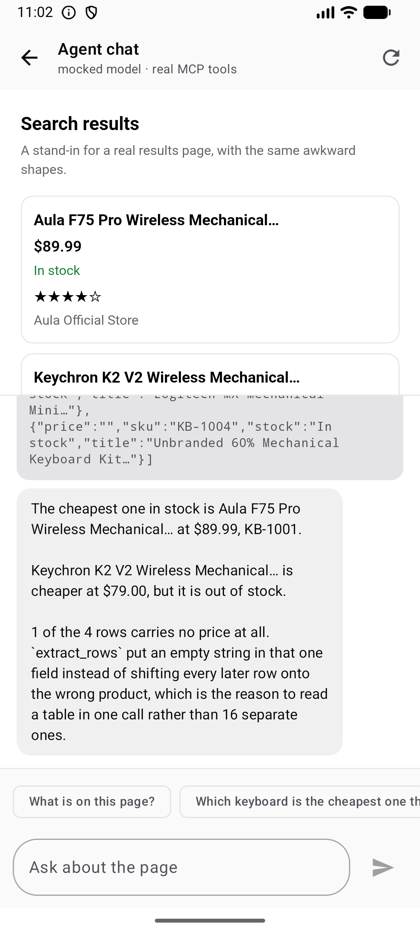
The chat uses a mocked model with a real MCP server. Each page action is an actual tools/call, and the UI shows the returned JSON alongside the answer.
One of the four rows has no price. extract_rows leaves its price empty, keeping later prices attached to the correct products.
That is the per-row extraction from part one, preserving the table the model needs to describe.
Using the tools with Koog
For agents written with Koog, vitre-koog provides the same thirteen tools as typed Kotlin objects.
The names match, so a system prompt written for one adapter works with the other.
PageDriver, the session registry, leases, and tool descriptions all live in the shared vitre-agent module.
A test in a module that can access both adapters builds their tool definitions and checks that every tool and argument description matches byte for byte.
Running against a real model exposed two problems that the mock missed.
Koog needs an HTTP transport as well as an LLM client. It discovers the transport through a service loader.
A build containing only the Anthropic client compiles but fails on the first request with No KoogHttpClient.Factory provider found.
The default agent loop also stopped too early with models that explain what they are doing. Anthropic models routinely return text and a tool call in the same message. After the tool result enters the history, Koog's default graph takes the text branch, ending the run after the first tool call with an answer such as "I'll search now." A strategy that checks for tool calls before text at both decision points fixed this. The same prompt then completed ten operations instead of one.
The VitrePageLease plugin reserves the page for the agent run and adds the lease to every call as metadata the model never sees.
If the model has to acquire a lease, include it in later calls, and release it, it can eventually forget a step without reporting an error.
The plugin's lease has a time-to-live (TTL), an expiration limit. The page stays reserved while the agent waits for the model, so an unlimited lease could leave a visible WebView unresponsive to its own app.
Working with four sites at once
Many useful tasks repeat one workflow across several sites, such as comparing a price at four shops or looking up a part from four distributors. Running them one at a time can spend three quarters of the elapsed time waiting on network requests that could run together.
A lane is one WebView with one site loaded as its main document.
It needs no surrounding host page, command routing, or initial handshake. X-Frame-Options, which controls whether a site can be embedded in a frame, does not apply to a top-level page.
Each lane has its own serializer, so its operations are ordered independently of the others.
The platforms differ in how they share browser processes:
| processes | shared main thread | |
|---|---|---|
iOS, four WKWebViews | four content processes | no, four main threads |
| Desktop, four CEF browsers | four renderer processes | no, four main threads |
Android, four WebViews | one renderer process | yes, one JS main thread |
Unlike Chrome, Android WebView uses one renderer process for every WebView in the app.
The four lanes can wait on network requests at the same time, but share one thread for parsing and running JavaScript.
iOS and desktop can do both kinds of work in parallel. On all three platforms, network waits, where most of the seconds are spent, overlap.
A shared thread that slowed every lane
This is my favorite measurement in the project because the symptom gave little clue about the cause.
On desktop, getResourceHandler lets the app handle a request. It runs on CEF's IO thread, and there is only one of those per browser process, shared by every lane.
The first version fetched the response on that thread, as Android's equivalent hook encourages.
On desktop, that blocked every other lane from starting a request until the fetch finished.
With four sites each taking 1500ms to respond, I measured:
| total | interceptions started | |
|---|---|---|
| fetch on the IO thread | 6270ms | 1500ms apart |
| interception off entirely | 1611ms | together |
| fetch on a worker (the fix) | 1743ms | together |
The renderers were working in parallel, but the requests reached them one at a time. The fix keeps the decision about whether to intercept on the IO thread and moves the fetch to a worker thread. CEF supports this through a resource handler that accepts the request and supplies the response later.
Why I removed the iframe version
For a while, Android used four <iframe>s inside one WebView. The network interceptor removed X-Frame-Options so sites that normally refused embedding would load.
It worked with live sites, but measurements gave me little reason to keep it.
Four WebViews created one renderer process. One WebView with four iframes also created one renderer process. I counted with ps, comparing against the app after a force stop.
Separate WebViews therefore did not give Android the process parallelism they give iOS.
They also did not meaningfully increase memory use. Once warmed up, the app used 192MB with iframes and 188MB with a pool of WebViews. That difference was noise; the memory was in the shared renderer either way. The pool was no faster on Android, but it removed several things that could break.
The iframe version needed a grid that collapsed unless it was position: fixed, a handshake to assign a lane with a minute-long retry window, and a navigation token to keep an old lane:ready message from satisfying the wrong wait.
It also needed 'unsafe-eval' added to every site's Content Security Policy (CSP). A script injected at document start runs in the page's own script environment. A site with a strict CSP could load and complete the handshake, then reject every workflow step.
The pool loads each site directly and needs none of those changes to network responses.
Given similar speed and memory use, I kept the version with fewer ways to fail. That is also why the library limits retries, reports invalid handles, and keeps its default connection inside the app: I want failures to be visible and recoverable.
Vitre is on GitHub and published to Maven Central as dev.ggoggam.vitre:vitre-core and related modules.
If you use it to control a page your app does not own, I would like to hear how it breaks.