Vitre - Driving a WebView Instead of Scraping It (Part 1)
Two years ago, I wrote about scraping and filling forms inside an app on the user's device. That still appeals to me: the device does the work, the app avoids a trip to a scraping server, and the user reads sites through their own signed-in accounts. It also avoids some of the legal complications of scraping another site's data from a server.
That post promised more implementation details. It took two years and a rewrite to get here. The result is Vitre, a WebView automation library for Kotlin Multiplatform. You give it a list of actions, and it runs them in an embedded browser on Android, iOS, or desktop. Your app, a test, or a language-model agent can provide those actions. This post covers the library's main features. The second explains how it coordinates callers, and the third covers agents.
Coordinating calls to a WebView
Apps often need to read a value, fill a form, wait for a table, or talk to a script inside a WebView.
Calling evaluateJavascript and handling its callback works for a single action. Several callers make it harder.
A waitFor check and the extract that depends on it can overlap with a user-triggered reload. Calls also have to run on the UI thread.
The platform differences add another source of bugs: Android uses webView.post { } around evaluateJavascript, while iOS uses WKWebView.evaluateJavaScript with different return behavior.
I shipped a bug where a boolean came back as true on one platform and "1" on another.
Vitre gives callers the same actions and ordering rules on every platform, implemented in a shared codebase.
Running on a device or a server
Puppeteer and Playwright already automate headless Chrome well. They have mature libraries and support features Vitre does not: full browser debugging access, network interception on every platform, request bodies, and many tabs in a session. For scraping one site from one place, I would use them.
The uses in the original post, such as collecting information from a user's banks or searching their signed-in shopping accounts, need a personalized browser session for each user. Hosting all those sessions has several costs.
A headless Chrome context can use hundreds of megabytes and a CPU core under load. Each active user needs an isolated signed-in session, so server costs grow with the user count. Vitre uses the browser on a device the user already owns.
A hosted browser also puts the user's credentials or live cookies on your infrastructure. That makes the service a target for breaches and, depending on the data, may bring duties as a regulated custodian. Running on the device keeps the session there.
Sites commonly rate-limit, challenge with CAPTCHAs, or block thousands of users sharing a datacenter IP range. Residential proxy pools add another cost that grows with usage and requires ongoing maintenance. Requests from the user's device already use their own connection, residential IP, and session.
There is also a legal difference. Courts and site terms tend to treat datacenter scraping more harshly than a user automating interactions with a site they are signed into.
Running on the device gives up central control. On iOS, it also gives up the ability to rewrite response headers. I accepted those limits to keep the browser and session with the user.
Describing actions as steps
Vitre defines a fixed set of steps: Navigate, LoadHtml, WaitFor, Click, Input, Extract, ExtractRows, Snapshot, EvaluateJs, PostMessage, and AwaitMessage.
A small Kotlin builder, or DSL, assembles them into a list. WorkflowEngine runs the list and emits an event for each step.
val workflow = workflow("hn-top-story", "Hacker News top story") {
    navigate("https://news.ycombinator.com/")
    waitFor(".titleline > a", timeoutMs = 15_000)
    extract(".titleline > a", into = "headline")
    extract(".titleline > a", into = "url", from = Source.Attribute("href"))
}

WorkflowEngine(controller).run(workflow).collect { event ->
    if (event is WorkflowEvent.Completed) println(event.variables["headline"])
}
The builder runs once before the workflow starts. Kotlin control flow inside it chooses which steps go into the list; it cannot react to the page because the page has not been touched yet.
An if therefore cannot use the result of an earlier step.
This limits branching, but makes a workflow ordinary data: it can be built, logged, sent elsewhere, and compared for equality.
It also lets an agent send steps as JSON. The WorkflowStep constructors used by the DSL are public, and the MCP server in part three calls the same constructors.
Reading a table
I use ExtractRows often. It returns one JSON record per matching row, with each column read within that row:
extractRows(rows = xpath("//li[@data-sku]"), into = "results", limit = 10) {
    // "." is the row itself — read its own attribute.
    column("sku", xpath("."), from = Source.Attribute("data-sku"))
    column("price", xpath(".//span[@class='price']"))
    // Matched on the text a human reads, not on a class hook.
    column("stock", xpath(".//*[normalize-space()='In stock']"))
}
Reading all prices and all SKUs separately, then pairing them by position, fails when a row has no price. Every later price gets paired with the wrong product.
ExtractRows keeps the columns together. A missing price becomes an empty string in that row's record.
Finding an element
Every step that acts on an element takes a Locator. There are three forms:
css("#results .item")      // the common case: short, familiar, fast
xpath("//li[@data-sku]")   // when you need more
handle("e7")               // an element a snapshot already found
A plain string means CSS.
XPath supports searches CSS cannot express: matching visible text, walking to ancestors with ancestor:: because CSS has no parent combinator, selecting an attribute as a node, filtering by position, and using count().
Neither searches through shadow DOM, the separate document trees used by some page components.
A handle names an element already found by a Snapshot.
CSS and XPath describe a search. A handle refers to a particular element in the document that issued it and expires when navigation replaces that document.
Using one from a previous page raises an error instead of finding a similar element on the new page.
Part three explains how agents use snapshots and handles.
Getting the same return values on every platform
evaluateJs returns a JSON-encoded result on every platform. Callers can decode it into a type instead of comparing strings:
val ready: Boolean = controller.evaluate("document.readyState==='complete'")
val rows: List<Product> = controller.evaluate("Array.from(document.querySelectorAll('li')).map(toRow)")
WebKit returns a Foundation object whose description prints JavaScript true as "1". Android returns JSON "true".
iOS now wraps scripts in JSON.stringify; desktop does the same before returning through the Chromium Embedded Framework (CEF) message router. This makes "true" decode as true everywhere.
The mismatch survived testing for months because both platforms returned a value without an error. The next post covers more bugs like it.
Exchanging messages with a page you own
For an app's own web screen, the native app and page can exchange messages directly.
PostMessage sends MessageEvent('vitre') into the page. AwaitMessage waits for a reply sent through window.vitre.postMessage.
Payloads use @Serializable classes, so callers do not have to build message strings by hand.
@Serializable data class Ack(val seen: Boolean)
@Serializable data class Token(val value: String, val expiresAt: Long)

loadHtml(html = checkoutHtml, baseUrl = "https://app.example.com")
waitFor("#pay")
click("#pay")
awaitMessage(type = "payment-token", into = "token", timeoutMs = 5_000)
The workflow builder has already finished by the time a reply arrives. The reply goes into a workflow variable and can be decoded with event.decodePayload<Token>("token").
Host code can use controller.bridge.request<Ack, Token>(...) to send a request and match its reply in one call.
The page may reply before the wait starts; part two explains how the bridge handles that.
Watching a workflow run
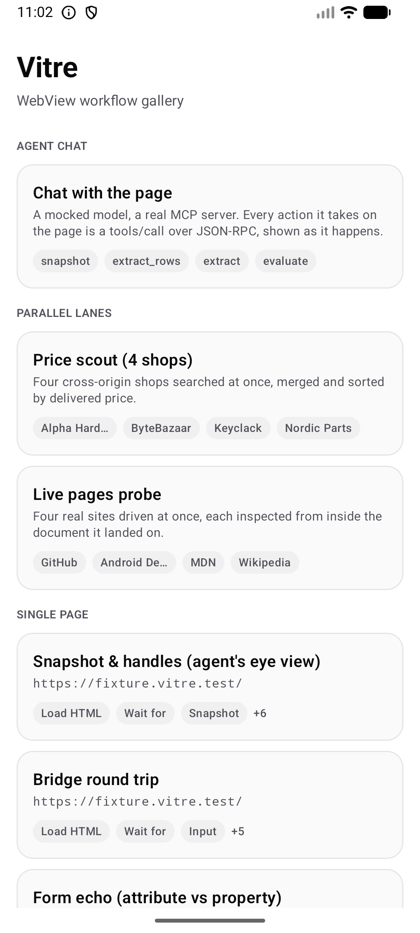
The sample app lists workflows. Running one shows the page above a record of each step and its result.
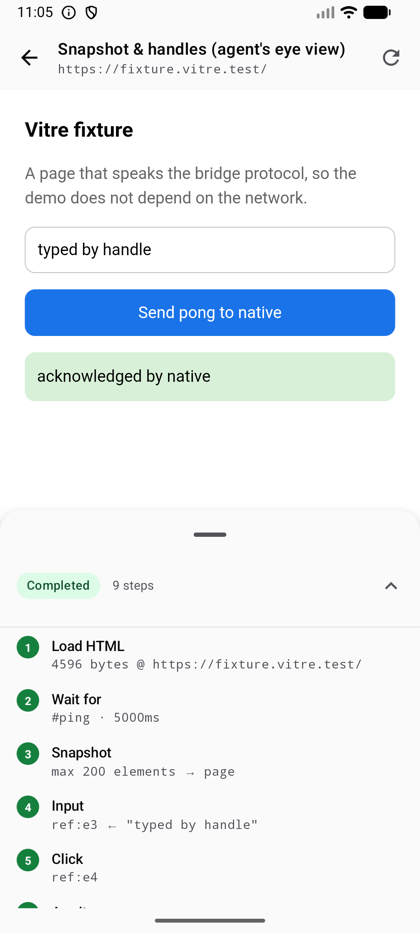
The same composeApp source runs on iOS and desktop. Above 720dp wide, the workflow list and runner appear side by side.
vitre-core has no Compose dependency. The builder, engine, message bridge, and controllers use Kotlin Multiplatform; VitreWebView adds a small Compose wrapper for apps that need it.
Why it targets mobile and desktop
Vitre relies on the native app's access to the network: relaxing cross-origin resource sharing (CORS) restrictions, serving test data, or reading the site's cookies. A browser tab has the same-origin restrictions of the page it hosts and lacks that native access. Those limits make this approach impractical as a general browser automation library. Vitre therefore targets mobile and desktop apps.
The next post covers the work I underestimated: letting the UI, a workflow, and an agent use one WebView without blocking its thread or interfering with each other's operations.