Vitre - One Thread, Many Callers (Part 2)
Part one described the steps Vitre uses to control a WebView. Most of my time went into deciding which caller could use the WebView, on which thread, and in what order.
A workflow follows a planned sequence. An agent adds calls at times the workflow cannot predict, and the UI can trigger actions such as reloads too. The hardest bugs came from those callers interfering with one another. I put the rules for coordinating them in one object.
WebViews must run on their own thread
WKWebView is part of UIKit, and every member must be called on the main thread. Calling it from another thread causes undefined behavior, often a hang or an incorrect result instead of an exception.
An Android WebView must be used on the thread that created it, usually the UI thread.
For a hosted WebView, both platforms therefore require calls on the main thread. Vitre has to move calls onto that thread and order them there.
One place for WebView calls
The engine prepares the work, the serializer coordinates access, and the UI observes the results:
   UI (Compose, main thread)          Agent / MCP / host code (any dispatcher)
            |                                        |
            | observes StateFlow                     | suspending calls
            v                                        v
   +-------------------------------------------------------------+
   |                     WorkflowEngine                          |
   |          Dispatchers.Default — selectors, JSON,             |
   |          variables. Never sees the WebView thread.          |
   +---------------------------------+---------------------------+
                                     |  one operation at a time
                        +------------v------------+
                        |    WebViewSerializer    |  <- the entire policy
                        |  - confines to main     |
                        |  - totally orders ops   |
                        |  - leases, for sequences|
                        +------------+------------+
                                     v
                        WKWebView / android.webkit.WebView
WebViewSerializer enforces two rules.
Every platform call runs through withContext(WebViewDispatcher). A caller can start on any thread and switch for one operation.
WebViewDispatcher is Dispatchers.Main.immediate on mobile and Dispatchers.Swing.immediate on desktop. If the caller is already on the UI thread, as the Compose host usually is, it does not need to switch.
Calls to navigate and evaluate share a lock, so one operation finishes before another begins.
Otherwise, a script running during someone else's navigation could act on whichever document happens to be loaded at that moment.
Waiting for an incoming message does not take this lock. The page may need another script to run before it can reply. Holding the lock while waiting would prevent that script from running and leave both sides stuck.
The engine parses selectors and decodes JSON on Dispatchers.Default, keeping that work off the UI thread.
The UI observes events and does not drive a controller directly.
Bugs this fixed
Each row below came from a bug I encountered. Most did not initially look like threading problems.
| Symptom | Cause | Fix |
|---|---|---|
| A workflow hung after navigation interrupted a script | Both platforms discard the pending script callback when the document is replaced | evaluate has a timeout and raises ScriptTimeoutException |
| A step failed after a click triggered a successful navigation | The page discarded the callback, so waiting for it made a healthy page look slow | evaluate detects a replacement document and resubmits once against the new page |
AwaitMessage waited forever | The page replied before the step subscribed, and SharedFlow had no replay buffer | WebViewInbox stores unread messages and consumes each once |
| Cancelling a run reported a failure | The engine caught Throwable, including CancellationException | Each internal timeout becomes a specific exception where it occurs, leaving cancellation at the top to mean the collector cancelled |
WaitFor(timeoutMs = 10_000) could run for a minute | The timer counted polling intervals but excluded time spent making calls between polls | Measure actual elapsed time |
iOS never satisfied a WaitFor | WebKit's description prints JavaScript true as "1"; Android returns "true" | Every platform wraps scripts in JSON.stringify |
Resubmitting after navigation needed a limit. Clicking a submit button can navigate away and discard the callback for the script running in the old document. Waiting longer will not bring that reply back. When the serializer sees a new document load instead of a result, it resubmits the operation once against that document. A second lost callback is treated as a failure. Retrying indefinitely would leave a broken operation hanging without reporting why.
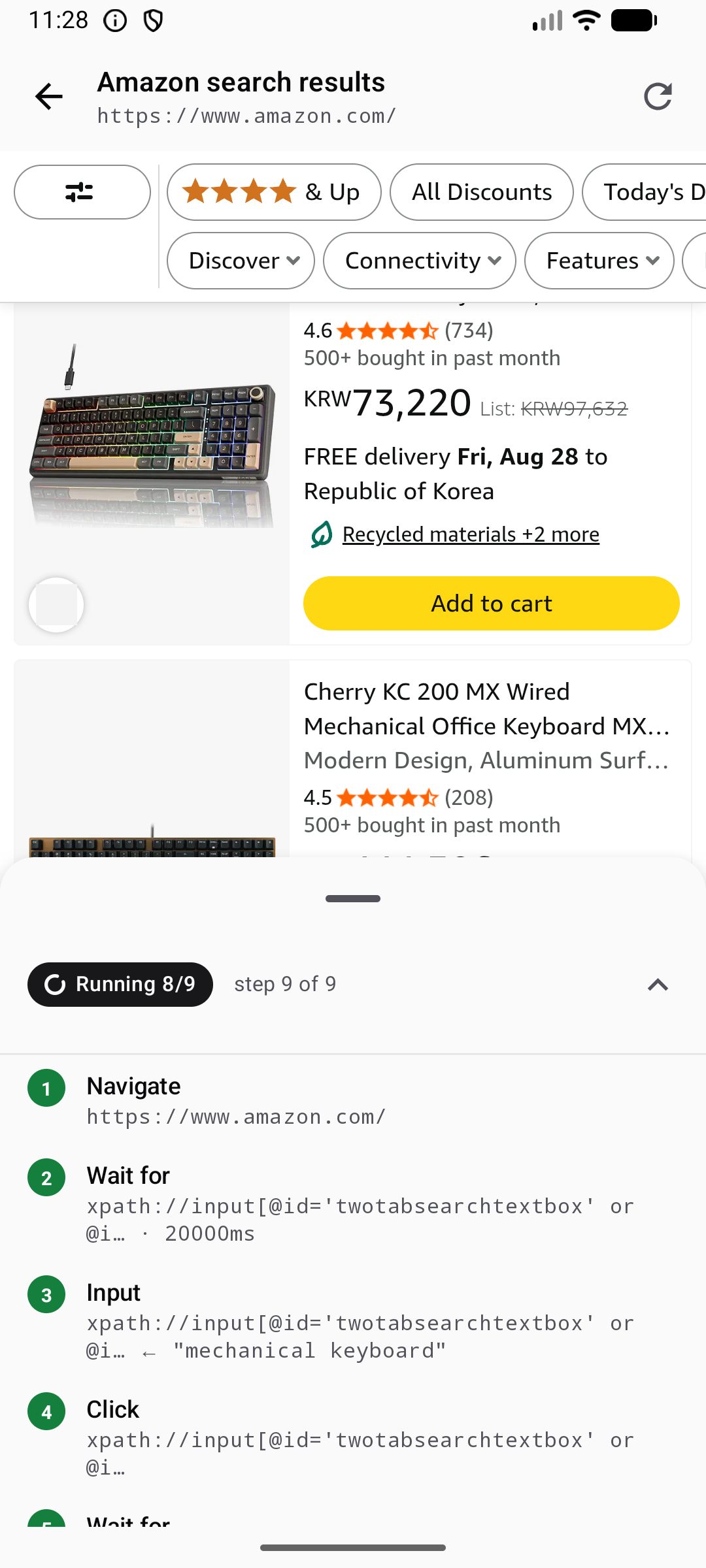
The screenshot shows the workflow at step nine of nine while the page renders. The user can tap reload at any point. That reload queues behind the current operation through the same lock.
A forged script result
The first async bridge had a security defect I am less proud of.
evaluateJs needs to wait for JavaScript promises: fetch is asynchronous, and a shop's own JSON API is often easier to read than its page elements, or DOM.
Initially, iOS used callAsyncJavaScript while Android used a wrapper around the message bridge. A constructor flag enabled this behavior and defaulted to false, so promises could still be silently serialized as {}.
The Android listener registered with setOf("*") and discarded the message's source origin. iOS installed its script with forMainFrameOnly = false and ignored frame information.
Results were matched to requests with a counter starting at zero.
A third-party iframe embedded in the page could guess that counter and send this:
window.vitre.postMessage(JSON.stringify({
  id: "script:result#1", type: "script:result",
  payload: { cid: 1, ok: true, value: "\"attacker's answer\"" }
}))
The forged message could complete an Extract with an answer chosen by the iframe. That was a serious problem for a library intended to control third-party sites.
Separating results and checking senders
I changed how the bridge handles script results, message sources, and request identifiers.
Send script results to their own handler
Script results used to enter the same inbox as page messages for AwaitMessage and the stream of messages exposed to observers.
Matching a result required an O(n) scan, checking unrelated messages one by one. Observers also received internal messages they did not need.
Each controller now has a ScriptResults object that sees incoming messages first. It takes script results and passes the rest to the inbox.
It matches results through a map lookup, keeps internal traffic out of the observer stream, and discards stale results immediately.
Check the frame and origin
Platform callbacks now retain the sender's origin and whether the message came from the main frame, the page's top-level document.
Only main-frame messages can satisfy a wait. An embedded ad cannot send {"type":"ready"} to complete an AwaitMessage intended for the page.
Messages from embedded frames still reach observers, because an error there can be useful information.
Add a random identifier
Each controller generates a random nonce, an identifier that cannot be predicted, when it is created.
The pending marker is __wv_pending:<nonce>:<cid>, and the result message must carry the nonce too. Guessing the counter is no longer enough.
There is still a limit. A script in the main frame shares the wrapper's JavaScript environment and can replace window.vitre.postMessage before it runs.
Protecting against that would require an isolated script environment. The main document can already lie through its own DOM, so the enforced boundary is that only the document being controlled may answer; embedded frames may not.
I also removed the opt-in flag. evaluateJs now waits for promises on every platform.
Using await on a plain value leaves its meaning unchanged, so callers no longer need to choose between synchronous and asynchronous evaluation.
Replies that arrive before the wait
A page can reply immediately when native code sends a request or clicks a button, before the caller starts waiting.
A plain SharedFlow drops that reply, leaving the caller to time out.
WebViewInbox stores unread messages. A wait checks that buffer first and takes a matching reply immediately if one is already there.
The replyTo field identifies the request being answered. It is separate from the message's own id, so replies can be matched correctly and distinguished from requests in the observer stream.
Callers use bridge.request<Ack, Token>("issue-token", Ack(seen = true)); the shared implementation handles the buffering and matching.
The last post covers agents, whose calls arrive at unpredictable times and sometimes need to hold a WebView for several operations together.